Cute Dingo Clipart
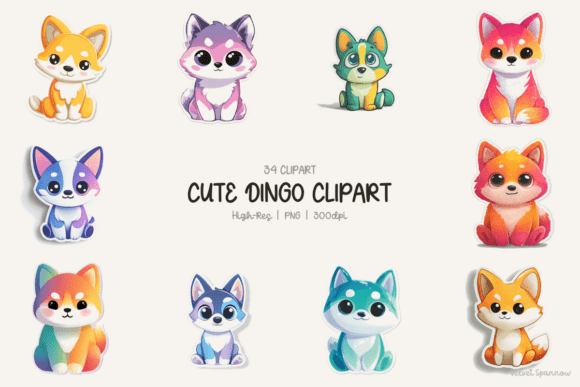
If you're designing for nurseries, crafting animal-themed classroom materials, or launching a small-batch sublimation product line, Cute Dingo Clipart isn’t just charming—it’s a functional asset. This set delivers 34 high-resolution PNG files (300 DPI), each featuring baby dingoes in joyful sitting poses, expressive eyes, and delicately rendered fur textures. What sets it apart isn’t just the golden-toned pups—it’s the thoughtful variety: pastel purples for gentle baby shower decor, cool blues for ocean- or sky-themed learning posters, vibrant rainbow styles for inclusive classroom visuals, and classic warm tones that feel timeless on nursery wall art.
Why “Adorable” Isn’t Enough—Check the Technical Foundation First
Many creators fall into the trap of selecting clipart based solely on cuteness—then hit roadblocks during production. A smiling dingo looks perfect on screen, but if the file lacks transparency, has inconsistent clipping paths, or uses low-resolution JPEG compression, it fails at critical moments: fading when enlarged on a t-shirt print, showing jagged edges on vinyl stickers, or pixelating in digital planners. This Cute Dingo Clipart set avoids those pitfalls by delivering clean, transparent PNGs with precise white sticker-style borders and soft shading—designed for immediate use across physical and digital mediums.
One common oversight? Assuming all “300 DPI” claims are equal. Some bundles label raster files as “high-res” without verifying actual pixel dimensions. At 300 DPI, these illustrations scale cleanly up to 8×10 inches without loss—ideal for printable wall art or large-format scrapbooking. Before downloading any clipart, verify the file specs: open one in your design software and check its native size (e.g., 2400×3000 pixels at 300 DPI = 8×10"). If the metadata is vague or missing, assume risk—not readiness.
Color Variety ≠ Visual Consistency—Use Palettes Intentionally
The 34 illustrations span golden, pastel purple, cool blue, and rainbow colorways—but that diversity only helps if applied with intention. Beginners often scatter all styles across one project (e.g., mixing rainbow and pastel dingoes on the same nursery mobile), unintentionally undermining visual cohesion. Instead, treat each palette as a design system: use the pastel purples exclusively for baby shower invitations and matching onesies; reserve the rainbow dingoes for inclusive lesson plans about Australian wildlife diversity; lean into the classic gold tones for heritage-inspired nursery decor or educational flashcards.
A better approach? Start with your end use. Need sublimation designs for light-colored mugs? The cool blues and golden tones hold up best under heat transfer—rainbow gradients may shift subtly. Creating printable planner stickers? Pastel purples offer excellent contrast against dark-mode digital planners. Match palette to purpose—not just preference.
Don’t Overlook Licensing—and Why “Personal Use Only” Can Cost You Later
Many free or low-cost clipart sources advertise “commercial use,” but bury restrictive clauses: no resale of standalone digital files, no use in logos, or limits on annual sales volume. This Cute Dingo Clipart set includes clear, straightforward licensing—allowing use in physical products (like T-shirts or stickers), digital goods (printable planners, classroom worksheets), and even client projects—without hidden caps or attribution requirements. Still, always read the license PDF before purchase. One educator accidentally used “free” clipart from an unverified site in a paid curriculum bundle—only to receive a cease-and-desist when the original creator enforced their “not for resale” clause.
Ask yourself: Will this go on merchandise I sell? In editable templates I license? On social media as branded content? If yes, confirm commercial rights cover *your specific use case*. When in doubt, email the creator directly—reputable designers respond promptly.
Fur Detail & Expressive Eyes Matter More Than You Think
At first glance, “cute” clipart seems interchangeable. But subtle details determine real-world performance. The fur accents in this Cute Dingo Clipart set aren’t decorative—they’re functional. Soft texture breaks up flat color fields, preventing banding in printed fabric or sublimation transfers. Expressive eyes (with gentle highlights and varied gaze directions) add personality without looking cartoonish—critical for educators wanting respectful, engaging wildlife representation.
Compare this to generic vector dingoes with solid-color bodies and no depth: they look fine on a blog post thumbnail, but flatten out on tactile surfaces like felt boards or embroidered patches. If your project involves hands-on learning tools or sensory-rich decor, prioritize illustration quality over quantity—even 10 highly detailed, well-proportioned dingoes outperform 50 simplistic ones.
Sticker-Style Borders Aren’t Just Pretty—They’re Practical
The clean white border with soft shading isn’t a stylistic flourish—it’s a production accelerator. It eliminates guesswork when cutting vinyl stickers or die-cutting paper crafts. No need to manually add drop shadows or white outlines in Illustrator. And because the shading is subtle—not harsh or overly contrasted—it prints cleanly on both light and medium-toned substrates (unlike heavy black outlines that dominate pastel backgrounds).
Test this before mass production: import one file into your cutting software and run a test cut on scrap vinyl. Does the border separate cleanly from the background? Does the fur detail survive the blade’s resolution? If not, the artwork wasn’t optimized for physical output—no matter how cute it looks online.
Before You Download or Buy—Three Quick Checks
- Verify format and transparency: Open a sample file in Preview (Mac) or Photos (Windows). Hover over the dingo—if the background shows checkerboard pattern, it’s transparent PNG. Solid white or colored background? Not suitable for layered designs.
- Confirm DPI and dimensions: Right-click > Properties > Details tab (Windows) or Get Info > More Info (Mac). Look for “Horizontal/Vertical Resolution” and “Dimensions.” Anything below 300 DPI or under 2000 pixels wide risks quality loss in print.
- Scan the license summary: Look for explicit permissions around sublimation, resale, and digital distribution. Avoid bundles that say “for personal use” then vaguely add “small business OK”—clarity prevents future friction.
Whether you’re a teacher prepping next week’s animal unit, a freelancer designing eco-friendly baby brand assets, or a small-batch crafter launching dingo-themed enamel pins, Cute Dingo Clipart bridges aesthetic appeal with technical reliability. It’s not about finding the cutest image—it’s about choosing the right tool for the job you actually have. And with 34 versatile, production-ready illustrations, you’re not just getting clipart. You’re getting confidence—in every print, stitch, sticker, and screen.