Cute Goose with Bow SVG Outline Drawing: A Practical Guide for Crafters
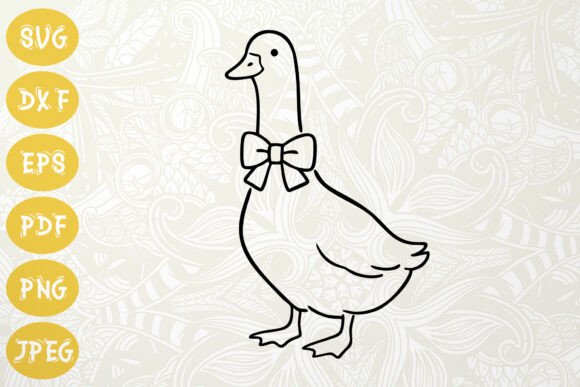
The Cute Goose with Bow SVG Outline Drawing is a single-layer vector illustration of a stylized goose wearing a delicate bow—designed specifically for digital crafting workflows. Unlike illustrated clipart or raster-based graphics, this file set delivers clean, scalable outlines optimized for precision cutting and consistent reproduction across materials. Its defining trait is simplicity: one continuous stroke path, no fills, no overlapping layers, and no embedded effects—making it especially well-suited for vinyl cutting, paper die-cutting, and hand-tracing applications.
How It Fits Into the Broader Landscape of Spring-Themed SVGs
Spring-themed SVGs fall into several functional categories: decorative illustrations (often multi-layered with color fills), silhouette cut files (solid black shapes), and outline drawings like the Cute Goose with Bow SVG Outline Drawing. While decorative SVGs excel in digital scrapbooking or layered print projects, they often require manual ungrouping or layer management before cutting—especially in entry-level software. Silhouettes work reliably on cutting machines but lack the fine-line charm and illustrative detail that outline drawings provide.
The Cute Goose with Bow SVG Outline Drawing occupies a middle ground: it offers expressive character and seasonal appeal without sacrificing technical readiness. Its outline format preserves visual nuance—the curve of the goose’s neck, the gentle loop of the bow—while remaining compatible with basic import functions in Cricut Design Space, Silhouette Studio (including the free Basic edition via DXF), and open-source tools like Inkscape. That balance makes it more versatile than a flat silhouette and more production-ready than a complex multi-color illustration.
File Formats and Real-World Compatibility
This download includes six distinct file types—SVG, DXF, EPS, PNG, JPEG, and PDF—each serving different stages of the creative process:
- SVG: The primary working file. Fully editable in vector editors and native to most modern cutting platforms. Supports layer preservation and scaling without loss.
- DXF: A fallback for users without Designer Edition in Silhouette Studio. Imports as a clean outline only—no colors or grouping—but remains fully cuttable.
- EPS: Ideal for professional print prep or integration into larger layouts in Adobe Illustrator or CorelDRAW. Maintains vector integrity and embeddable fonts (though this design uses none).
- PNG: Transparent-background raster version. Useful for mockups, digital cards, or tracing by hand when vector software isn’t available.
- JPEG & PDF: High-resolution (300 dpi), print-ready versions. Best for direct printing on cardstock, gift wrap, or wall art—no editing needed.
This breadth means the Cute Goose with Bow SVG Outline Drawing doesn’t lock users into one toolchain. Someone using a Cricut Explore Air 2 can start with the SVG; a hobbyist on an older Windows laptop with only Silhouette Studio Basic can rely on the DXF; and a small-batch printer preparing Easter greeting cards can use the PDF without opening any design software.
Strengths in Practice: Where This SVG Excels
The Cute Goose with Bow SVG Outline Drawing performs especially well in contexts where clarity, scalability, and minimal setup matter:
- Vinyl decals for mugs or jars: The single-layer outline cuts cleanly on most machines—even at small sizes (e.g., 1.5 inches tall)—without nested paths or stray nodes that cause hesitation or double-cutting.
- Farmhouse-style wall art: When printed large on matte cardstock or mounted on wood, the clean line weight holds up visually without pixelation or muddy edges.
- Easter cards and gift tags: The bow adds thematic warmth without overwhelming the composition—unlike busier Easter motifs (bunnies with baskets, eggs with patterns) that can clutter small formats.
- T-shirt transfers or iron-on appliqués: As a vector outline, it converts predictably to heat-transfer vinyl (HTV) or screen-print separations, avoiding fill-area inconsistencies common with shaded illustrations.
Its stylistic restraint also supports customization: users can easily adjust stroke weight, add hand-lettered phrases nearby, or pair it with botanical elements (like simple tulips or daisies) without visual competition.
Limitations and Situations Where Alternatives May Be Better
No single SVG suits every need—and understanding where the Cute Goose with Bow SVG Outline Drawing falls short helps avoid mismatched expectations:
- No built-in color or shading: If your project requires ready-to-print full-color artwork (e.g., a digital greeting card with pastel fills), you’ll need to add those manually—or choose a pre-colored SVG instead.
- Not optimized for embroidery digitizing: While the outline is clean, embroidery files require specific stitch logic, underlay, and pull compensation. This SVG would need conversion in dedicated software like Embrilliance or Wilcom—not a plug-and-play option for machine embroidery.
- Limited adaptability for animation or web use: As a static vector, it lacks interactivity or responsive scaling features found in SVGs built for web development (e.g., with CSS classes or JavaScript hooks). It’s not intended for live websites or interactive e-cards.
- Single subject focus: If you’re building a coordinated set—say, a full spring animal family (duck, chick, lamb)—this goose stands alone. You’d need to source matching styles separately or commission custom work.
Making the Right Choice: Decision Factors to Consider
Choosing whether the Cute Goose with Bow SVG Outline Drawing fits your project depends less on broad category labels (“spring SVG”) and more on concrete workflow needs:
- What’s your primary output method? Vinyl cutting, paper crafts, or print-and-go? If yes—and especially if you value clean lines and easy scaling—this outline drawing aligns well.
- Which software do you actually use—and what version? Users on Silhouette Studio Basic benefit significantly from the included DXF. Those relying solely on Canva or non-vector tools may find the PNG or PDF more immediately usable.
- How much time do you want to spend editing versus executing? This SVG minimizes prep: no ungrouping, no node cleanup, no color separation. If your priority is speed and reliability over artistic control, that’s a meaningful advantage.
- Is thematic tone as important as function? The goose conveys gentle, nostalgic spring energy—not exuberant or cartoonish. If your brand or project leans rustic, vintage, or minimalist, its aesthetic coherence matters as much as its technical specs.
In practice, many crafters use this type of outline SVG alongside other resources: pairing it with a coordinating font for Easter tags, layering the PNG over a watercolor background for printable cards, or scaling the EPS into a repeat pattern for fabric printing. Its strength lies not in doing everything, but in doing one thing—clean, expressive outlining—consistently and well.
Final Thoughts for Informed Selection
The Cute Goose with Bow SVG Outline Drawing is a focused, technically sound resource—not a catch-all solution, but a reliable component within a broader creative toolkit. It reflects thoughtful design choices around compatibility, scalability, and seasonal appropriateness. For makers who prioritize ease of use across platforms, appreciate subtle character in their motifs, and work across physical and printed outputs, it offers tangible utility. As with any digital asset, its value emerges not in isolation, but in how seamlessly it integrates into your existing process—and supports the outcome you envision.